Getting Started with Deployment
This guide will help you get started with deploying Rooms in your environment. Follow the steps below to ensure a smooth deployment process.
System Requirements
To run Rooms effectively, your system should meet the following minimum specifications:
| Requirement | Minimum Specification |
|---|---|
| CPU | 2 cores |
| RAM | 8 GB |
| Storage | 40 GB |
| Operating System | Alpine Linux 3.20+ (or compatible) |
| Architecture | x86_64 |
Prerequisites
Before you begin the deployment, ensure that you have the following prerequisites in place:
Required Software:
- Docker and Docker Compose
- OpenSSL
- Git
- Cron (usually pre-installed on Linux systems)
Required Access:
- Firewall port configuration rights
- A domain name for your deployment
What You’ll Deploy
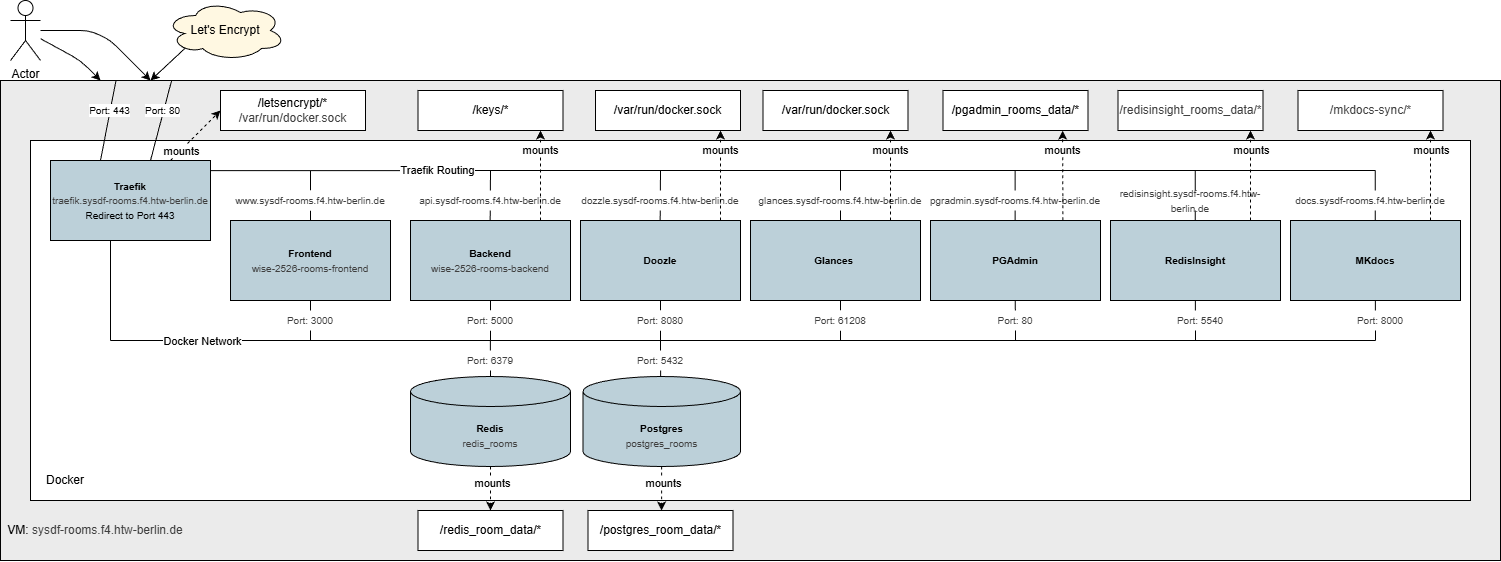 Figure 1: Complete deployment architecture showing all components and their relationships
Architecture Overview
The deployment consists of the following key components:
- Rooms Backend: The core application server handling business logic and API requests.
- Rooms Frontend: The user interface for interacting with the Rooms application.
- PostgreSQL Database: The primary database for storing application data.
- Redis Cache: An in-memory data structure store.
- Traefik Reverse Proxy: Manages incoming traffic and routes requests to the appropriate services.
- Monitoring Tools: Includes Glances, Dozzle, PgAdmin, and RedisInsight for system and application monitoring.
- Documentation Server: Hosts the mkdocs-based documentation for easy access.
For a detailed breakdown of each component, see the Architecture Documentation.
Deployment Steps
- Firewall Configuration: Ensure that the necessary ports are open as described in the Firewall Configuration guide.
- DNS Setup: Configure DNS settings for your domain as outlined in the DNS Setup guide.
- Prepare Installation Environment: Set up the installation environment by following the steps in the Prepare Install Environment guide.
- Deploy Application: Deploy the application using Docker Compose as detailed in the Deploy: Docker Compose guide.